AI chat for MOHRE- A UAE government authority
AI chat for MOHRE- A UAE government authority
Chat is a small part of the tool ,i.e, Mohre- It basically helps the economists of Dubai to analyze data by comparing the information present in there database. And based on the output they can predict the future economic situation
Chat is a small part of the tool ,i.e, Mohre- It basically helps the economists of Dubai to analyze data by comparing the information present in there database. And based on the output they can predict the future economic situation
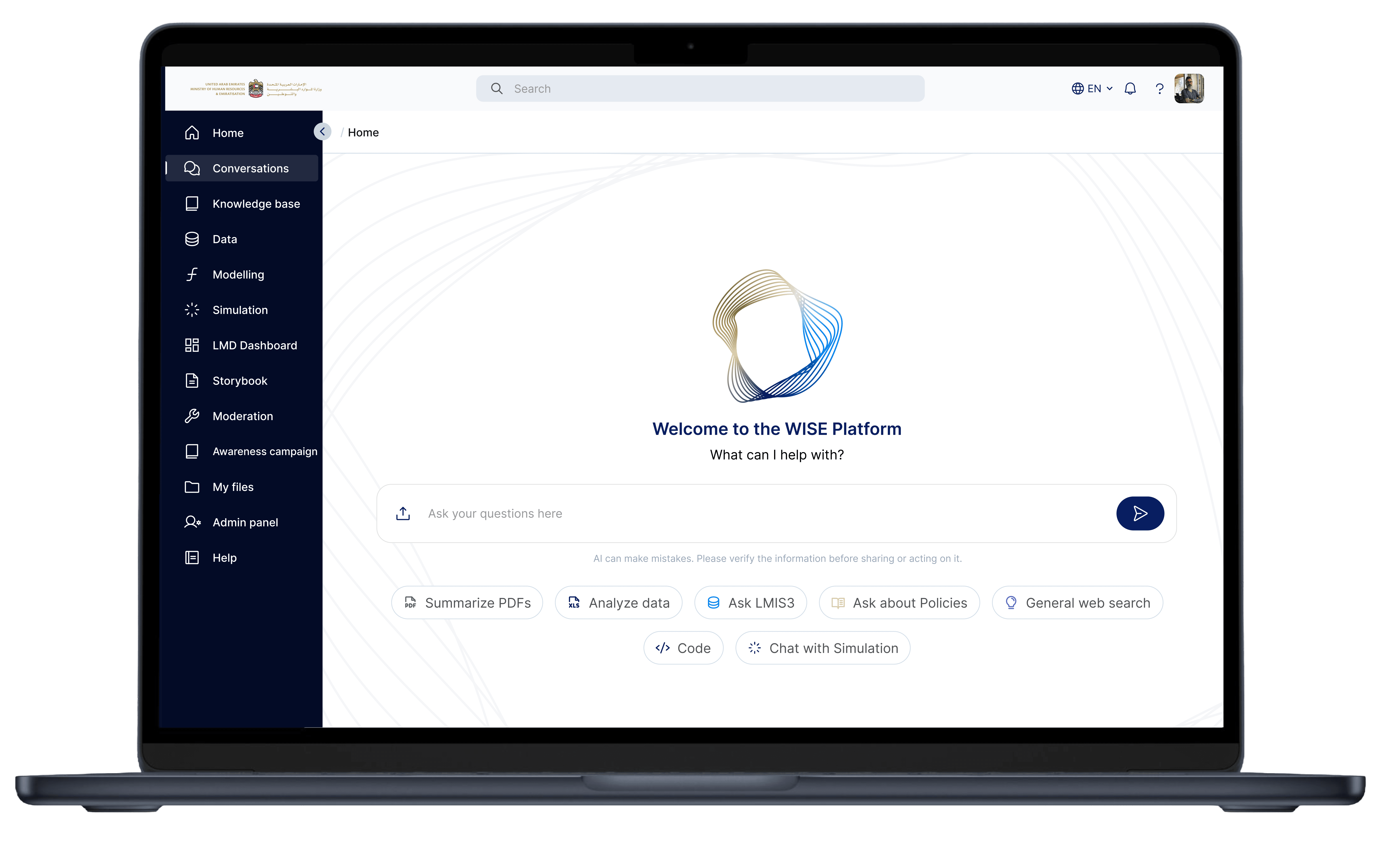
AI chat for MOHRE- A UAE government authority
Chat is a small part of the tool ,i.e, Mohre- It basically helps the economists of Dubai to analyze data by comparing the information present in there database. And based on the output they can predict the future economic situation
Challenges and solutions
Empty state anxiety
When users first open an enterprise AI platform, they often feel confused about what to do or what to type. To reduce this hesitation, the platform avoids a blank screen and instead guides users with a large search bar, suggested prompts, and workflow chips like “Analyze Data” or “Summarize PDFs.” This helps users quickly understand the platform’s capabilities and start interacting with confidence.
Allowing users to think in tasks, not technologies
The platform supports multiple powerful capabilities such as PDF summarization, simulations, web search, policy analysis, and coding assistance. However, showing all these features directly can feel overwhelming for users, especially in an enterprise environment. To simplify the experience, the platform presents these capabilities as clear task-oriented chips like “Summarize PDFs,” “Analyze Data,” “Ask LMIS3,” and “Chat with Simulation.” This helps users understand what they can do without needing to learn the technical side of the system.
Challenges and solutions
Challenges and solutions
Empty state anxiety
Empty state anxiety


When users first open an enterprise AI platform, they often feel confused about what to do or what to type. To reduce this hesitation, the platform avoids a blank screen and instead guides users with a large search bar, suggested prompts, and workflow chips like “Analyze Data” or “Summarize PDFs.” This helps users quickly understand the platform’s capabilities and start interacting with confidence.
When users first open an enterprise AI platform, they often feel confused about what to do or what to type. To reduce this hesitation, the platform avoids a blank screen and instead guides users with a large search bar, suggested prompts, and workflow chips like “Analyze Data” or “Summarize PDFs.” This helps users quickly understand the platform’s capabilities and start interacting with confidence.


Allowing users to think in tasks, not technologies
Allowing users to think in tasks, not technologies
The platform supports multiple powerful capabilities such as PDF summarization, simulations, web search, policy analysis, and coding assistance. However, showing all these features directly can feel overwhelming for users, especially in an enterprise environment. To simplify the experience, the platform presents these capabilities as clear task-oriented chips like “Summarize PDFs,” “Analyze Data,” “Ask LMIS3,” and “Chat with Simulation.” This helps users understand what they can do without needing to learn the technical side of the system.
The platform supports multiple powerful capabilities such as PDF summarization, simulations, web search, policy analysis, and coding assistance. However, showing all these features directly can feel overwhelming for users, especially in an enterprise environment. To simplify the experience, the platform presents these capabilities as clear task-oriented chips like “Summarize PDFs,” “Analyze Data,” “Ask LMIS3,” and “Chat with Simulation.” This helps users understand what they can do without needing to learn the technical side of the system.

Government
products are
complex
Government
products are
complex
Government platforms are often seen as complex, outdated, and difficult to navigate. To change this perception, the interface uses a clean and modern visual style with large whitespace, a minimal layout, soft neutral colors, and rounded UI components. These design choices make the platform feel lighter, more approachable, and easier to use, while still maintaining the trust and professionalism expected from a government system.
Leveraged context switching
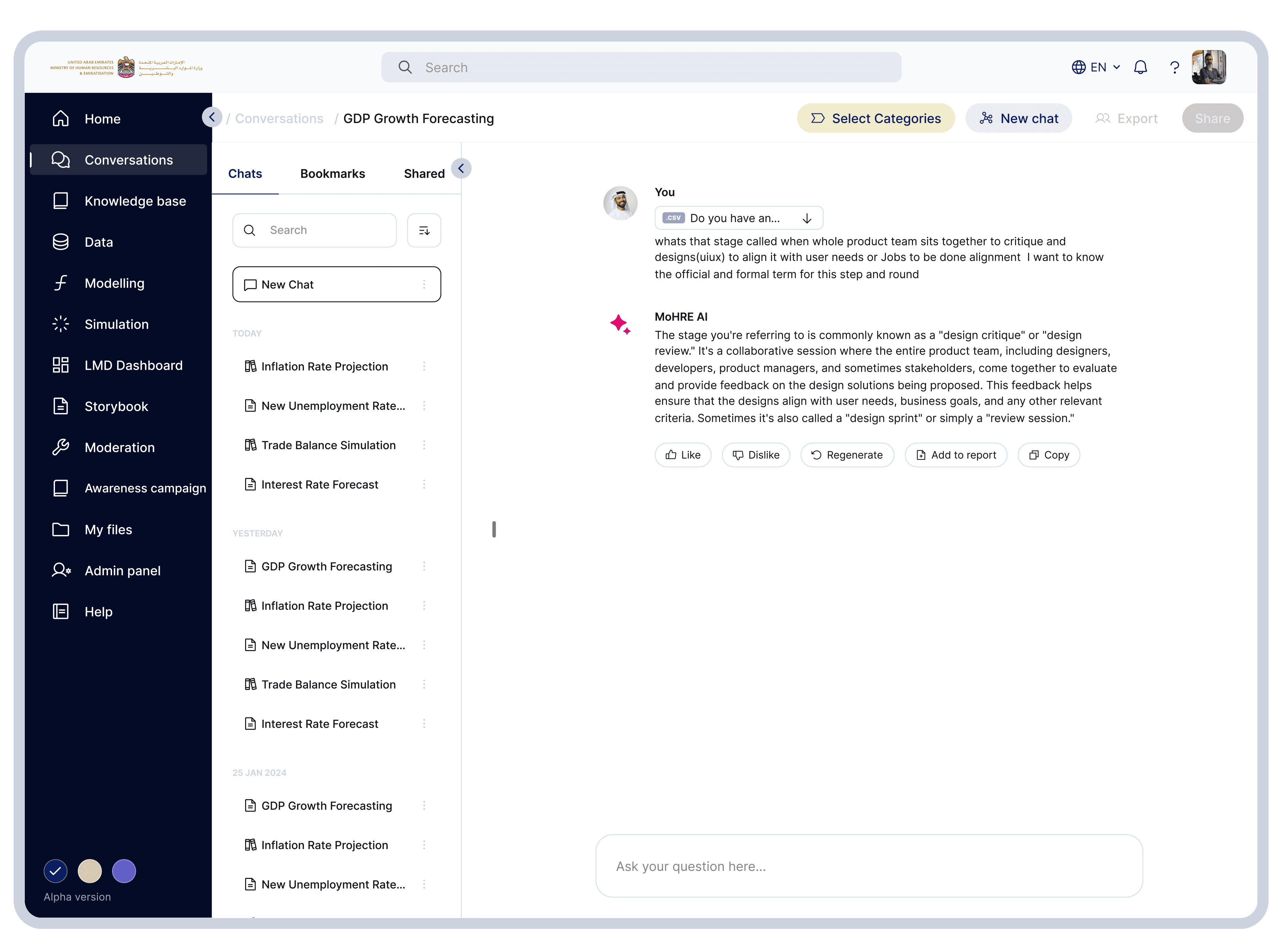
Users needed search, past chats, current conversation, shared research, all simultaneously, so provided with three column architecture for easy navigation. It improves productivity
Enterprise knowledge retention
Government teams need a way to save and revisit important AI conversations and research. To support this, the platform includes bookmarks, shared chats, exports, and organized conversation history. This turns AI chats from temporary discussions into reusable knowledge assets.
Adding confidence in outputs
Government environments require AI responses to be reliable and traceable. Especially, the “Add to report” feature shows that AI outputs are designed to become part of formal and collaborative workflows, not just temporary chat responses.
Massive information density
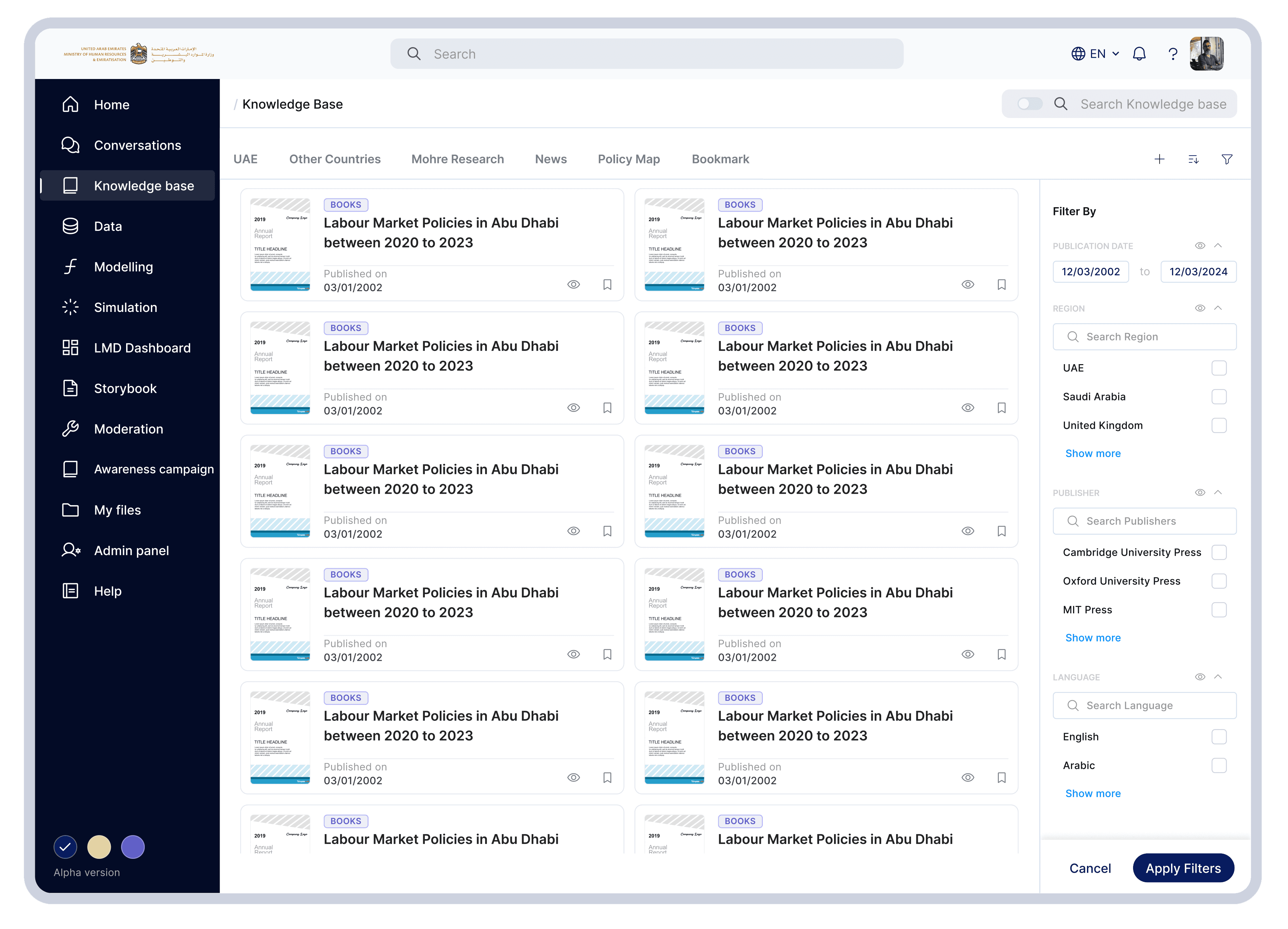
Research libraries usually contain a large amount of documents and information, which can feel overwhelming for users. To make browsing easier, the platform uses a card-based layout where important details like metadata, publication date, category labels, and preview icons are visible at a glance. This helps users quickly scan and identify relevant documents without feeling overloaded.
AI + Knowledge Base Integration
Most enterprise platforms keep document search and AI systems separate, which creates extra steps for users. This platform combines both experiences into a single workflow. Users can discover a document, open it, and directly ask AI questions about its content. This creates a more intelligent and connected research experience using a modern Retrieval-Augmented Generation (RAG) approach.
Advanced filtering
Users often need to search documents using different filters such as region, publisher, date, or language. Managing all these filters can become confusing if they are hidden or difficult to access. To solve this, the platform uses a persistent right-side filter panel with searchable filters and expandable categories. This keeps filtering simple, visible, and easy to use without overwhelming the user.
Government
products are
complex
Government
products are
complex
Government platforms are often seen as complex, outdated, and difficult to navigate. To change this perception, the interface uses a clean and modern visual style with large whitespace, a minimal layout, soft neutral colors, and rounded UI components. These design choices make the platform feel lighter, more approachable, and easier to use, while still maintaining the trust and professionalism expected from a government system.
Government platforms are often seen as complex, outdated, and difficult to navigate. To change this perception, the interface uses a clean and modern visual style with large whitespace, a minimal layout, soft neutral colors, and rounded UI components. These design choices make the platform feel lighter, more approachable, and easier to use, while still maintaining the trust and professionalism expected from a government system.
Leveraged context switching
Leveraged context switching
Users needed search, past chats, current conversation, shared research, all simultaneously, so provided with three column architecture for easy navigation. It improves productivity
Users needed search, past chats, current conversation, shared research, all simultaneously, so provided with three column architecture for easy navigation. It improves productivity
Enterprise knowledge retention
Enterprise knowledge retention
Government teams need a way to save and revisit important AI conversations and research. To support this, the platform includes bookmarks, shared chats, exports, and organized conversation history. This turns AI chats from temporary discussions into reusable knowledge assets.
Government teams need a way to save and revisit important AI conversations and research. To support this, the platform includes bookmarks, shared chats, exports, and organized conversation history. This turns AI chats from temporary discussions into reusable knowledge assets.
Adding confidence in outputs
Adding confidence in outputs
Government environments require AI responses to be reliable and traceable. Especially, the “Add to report” feature shows that AI outputs are designed to become part of formal and collaborative workflows, not just temporary chat responses.
Government environments require AI responses to be reliable and traceable. Especially, the “Add to report” feature shows that AI outputs are designed to become part of formal and collaborative workflows, not just temporary chat responses.
Massive information density
Massive information density
Research libraries usually contain a large amount of documents and information, which can feel overwhelming for users. To make browsing easier, the platform uses a card-based layout where important details like metadata, publication date, category labels, and preview icons are visible at a glance. This helps users quickly scan and identify relevant documents without feeling overloaded.
Research libraries usually contain a large amount of documents and information, which can feel overwhelming for users. To make browsing easier, the platform uses a card-based layout where important details like metadata, publication date, category labels, and preview icons are visible at a glance. This helps users quickly scan and identify relevant documents without feeling overloaded.
AI + Knowledge Base Integration
AI + Knowledge Base Integration
Most enterprise platforms keep document search and AI systems separate, which creates extra steps for users. This platform combines both experiences into a single workflow. Users can discover a document, open it, and directly ask AI questions about its content. This creates a more intelligent and connected research experience using a modern Retrieval-Augmented Generation (RAG) approach.
Most enterprise platforms keep document search and AI systems separate, which creates extra steps for users. This platform combines both experiences into a single workflow. Users can discover a document, open it, and directly ask AI questions about its content. This creates a more intelligent and connected research experience using a modern Retrieval-Augmented Generation (RAG) approach.
Advanced filtering
Advanced filtering
Users often need to search documents using different filters such as region, publisher, date, or language. Managing all these filters can become confusing if they are hidden or difficult to access. To solve this, the platform uses a persistent right-side filter panel with searchable filters and expandable categories. This keeps filtering simple, visible, and easy to use without overwhelming the user.
Users often need to search documents using different filters such as region, publisher, date, or language. Managing all these filters can become confusing if they are hidden or difficult to access. To solve this, the platform uses a persistent right-side filter panel with searchable filters and expandable categories. This keeps filtering simple, visible, and easy to use without overwhelming the user.

Simplifying analytical
workflow
Simplifying analytical
workflow
Simplifying analytical
workflow
Datasets are difficult for non-technical users
Datasets are difficult for non-technical users
Datasets are difficult for non-technical users
Non-technical users often find datasets difficult because they are not familiar with SQL, database structures, or column mapping. To make this easier, the platform simplifies the process into simple actions like search, filters, and row selection, allowing users to start analyzing data without technical knowledge.
Non-technical users often find datasets difficult because they are not familiar with SQL, database structures, or column mapping. To make this easier, the platform simplifies the process into simple actions like search, filters, and row selection, allowing users to start analyzing data without technical knowledge.
Advanced filtering
Important UX decisions
Users often need to search documents using different filters such as region, publisher, date, or language. Managing all these filters can become confusing if they are hidden or difficult to access. To solve this, the platform uses a persistent right-side filter panel with searchable filters and expandable categories. This keeps filtering simple, visible, and easy to use without overwhelming the user.
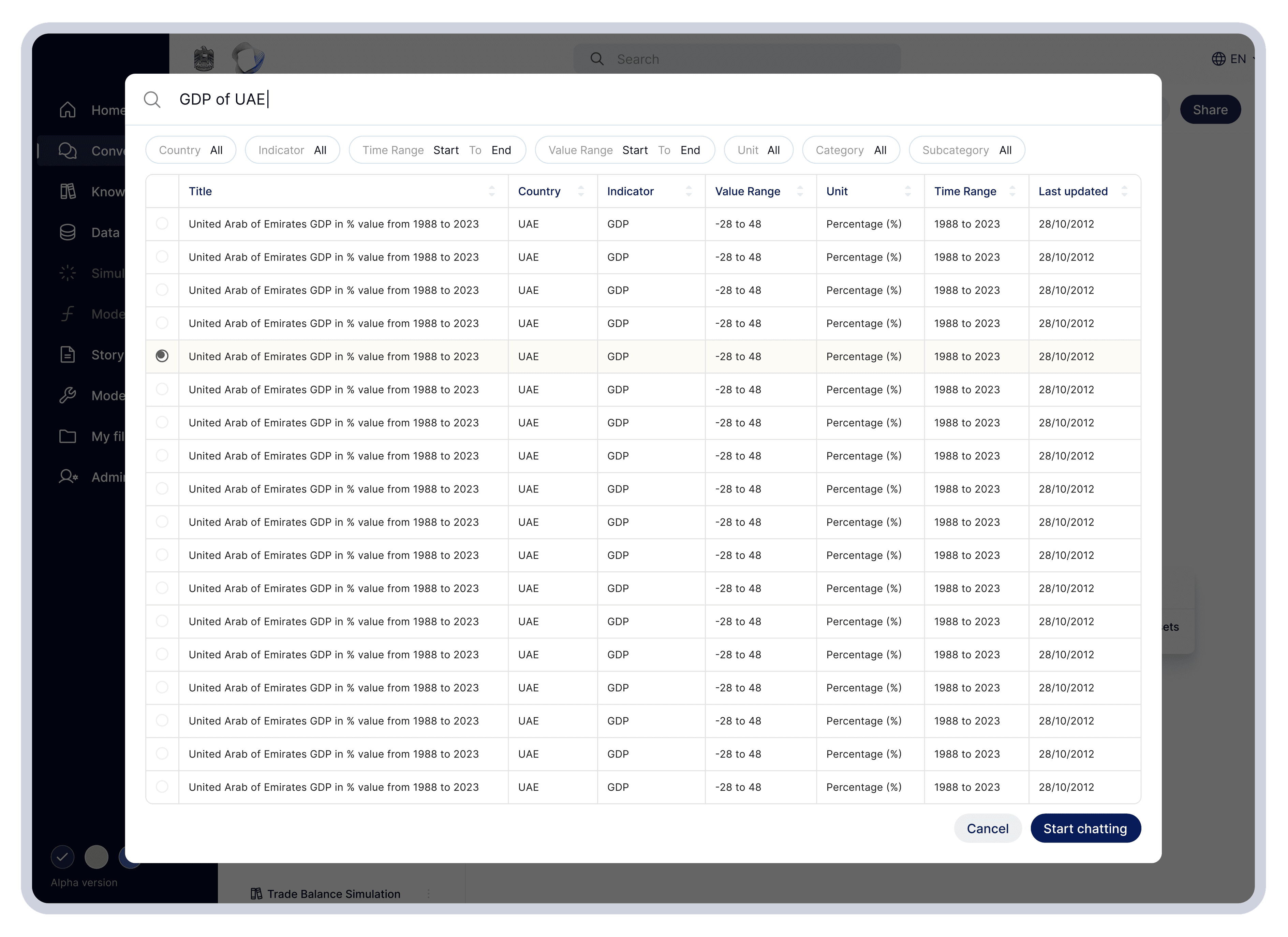
The platform simplifies dataset discovery by allowing users to search naturally with queries like “GDP of UAE” instead of technical table names. Dataset details such as country, indicator, and time range are shown clearly, helping users validate data before analysis. The “Start chatting” CTA then guides users from data selection to AI-powered analysis in a simple workflow.
More works
Hard to look away?
Understanding real user needs, balancing business goals, and applying 7+ years of product design experience helps me craft experiences like this. If you wish to create something like this, reach out to me
Contact me
@Portfolio Design
Important UX decisions
Important UX decisions
The platform simplifies dataset discovery by allowing users to search naturally with queries like “GDP of UAE” instead of technical table names. Dataset details such as country, indicator, and time range are shown clearly, helping users validate data before analysis. The “Start chatting” CTA then guides users from data selection to AI-powered analysis in a simple workflow.
The platform simplifies dataset discovery by allowing users to search naturally with queries like “GDP of UAE” instead of technical table names. Dataset details such as country, indicator, and time range are shown clearly, helping users validate data before analysis. The “Start chatting” CTA then guides users from data selection to AI-powered analysis in a simple workflow.
More works
More works
Transforming complex product search into effortless discovery
Transforming complex product search into effortless discovery
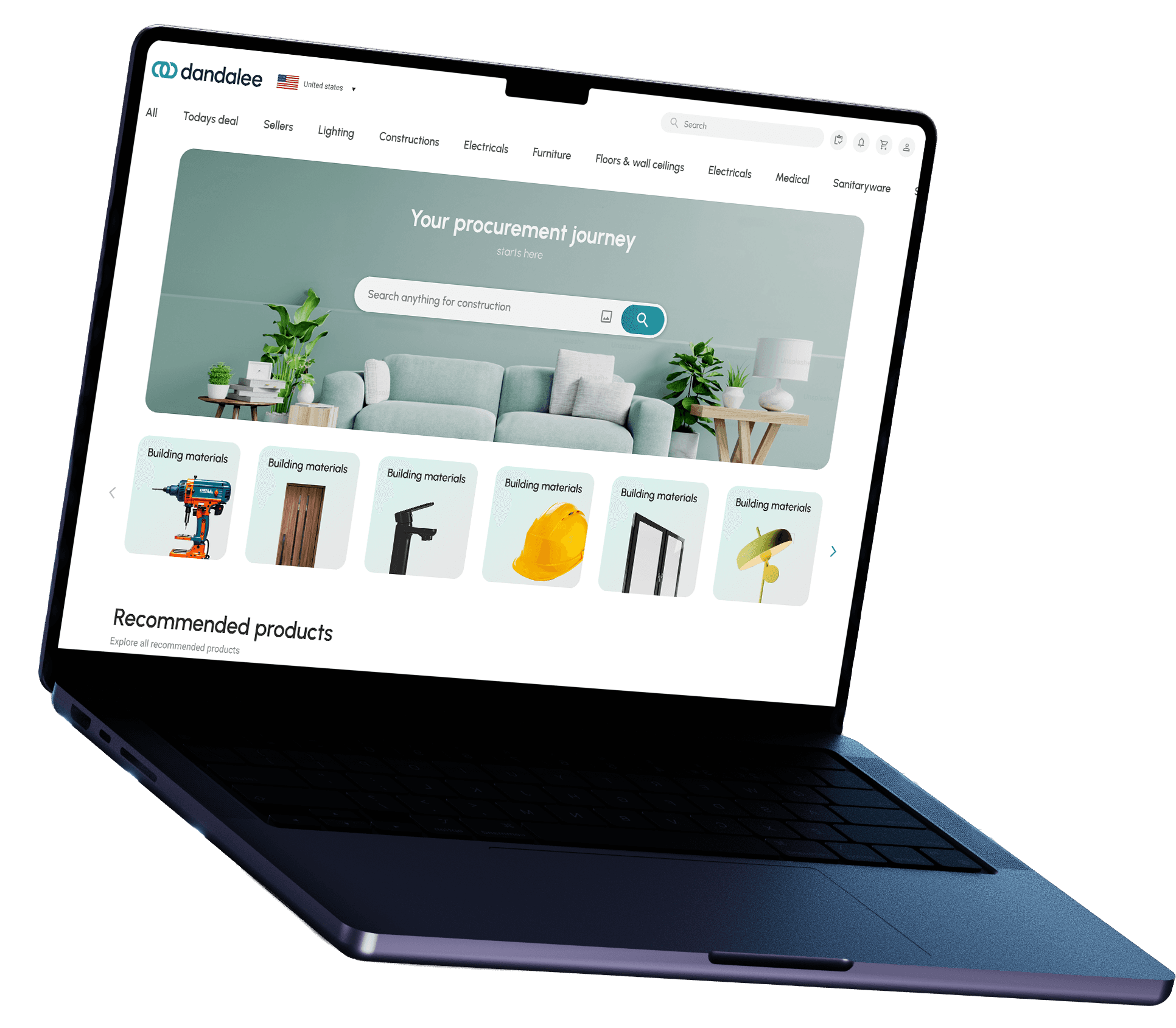

Led the project from 0 to 1 and reached to more than 100k MAU in just 2 months
Led the project from 0 to 1 and reached to more than 100k MAU in just 2 months
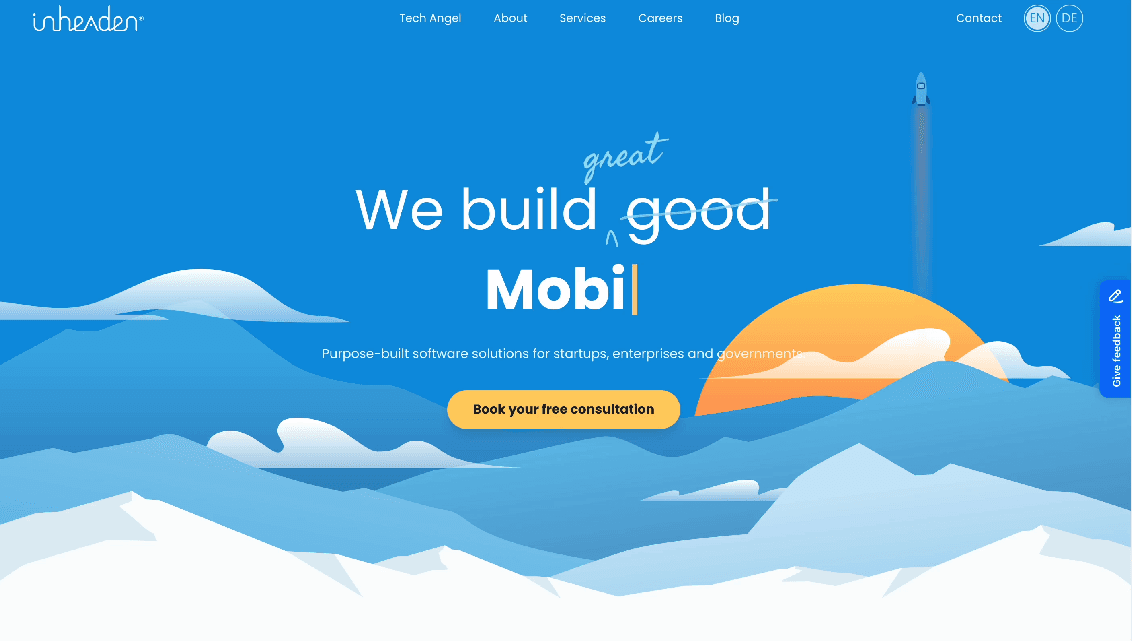
Turning Inheaden website into a conversion engine
Turning Inheaden website into a conversion engine
Reduced early drop-offs by 30% & increased qualified inbound inquiries
Reduced early drop-offs by 30% & increased qualified inbound inquiries
Hard to look away?
Hard to look away?
Understanding the real user needs, business aspect and more than 7 years of design expertise allows me to create something like this. If you wish to create something like this, reach out to me
Understanding the real user needs, business aspect and more than 7 years of design expertise allows me to create something like this. If you wish to create something like this, reach out to me
Contact me
Contact me